How to add a buy bot to your Telegram group
A buy bot posts every purchase of your token in your Telegram group, with the size, the buyer wallet and a chart button. It keeps the chat alive and shows new visitors that people are buying. Here is how to set one up for free in about two minutes.
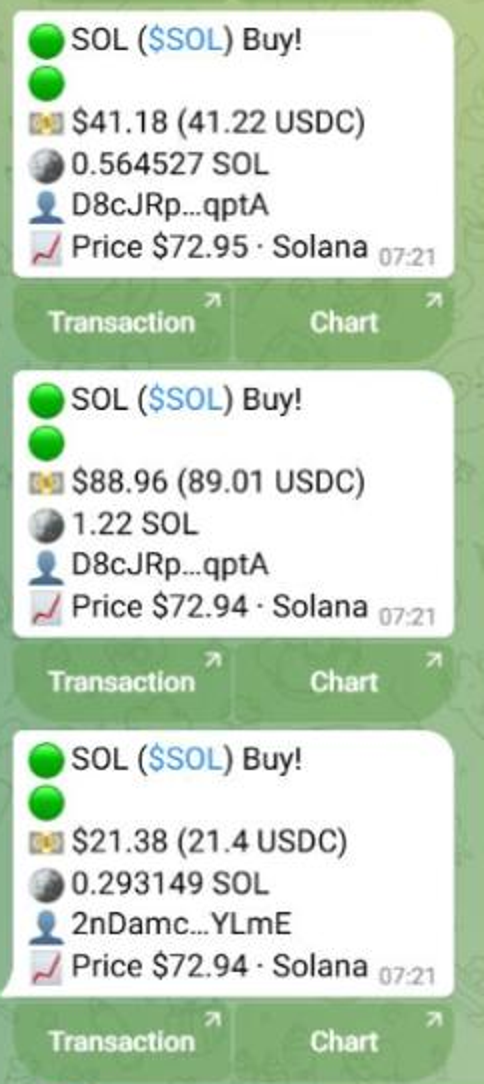
Step by step
Add the bot to your group
Open this link in Telegram, pick your group and press Add. The bot needs permission to send messages; it does not need admin rights to post buys.
Tell it your token
In the group, an admin sends
/buybotfollowed by the token name or contract address, for example/buybot pepeor/buybot 0x6982508145454ce325ddbe47a25d4ec3d2311933 eth.Pick the chain if needed
Many tokens share a name. Add the chain to be sure:
eth,bsc,base,solana,ton,polygonorarbitrum. The bot replies with the pool it picked, so you can check.Set a minimum buy size
Add a dollar amount at the end to skip tiny buys, for example
/buybot pepe eth 100posts only buys of $100 or more. The default is $50.Done: buys appear within a minute
Each post shows the dollar size as green dots, a whale mark for buys over $10,000, the tokens bought, the wallet, the price, and Transaction and Chart buttons. Stop it any time with
/buybot off.
Tips
- Only group admins can start, change or stop the buy bot, so members cannot point it at another token.
- The bot follows the pool with the most real traders. Pools with fake, wash-traded volume are ignored.
- Too many posts? Raise the minimum, e.g.
/buybot pepe eth 500. Bursts are grouped into a short summary.
Questions
Is the Telegram buy bot free?
Yes, the demo bot is free to use in your group. A version with your own bot name and logo, plus price alerts and charts, starts at $59.
Does the buy bot need my wallet or private keys?
No. It only reads public blockchain trades. It never asks for keys and cannot move funds.
Why is my token not found?
Send the contract address with the chain, e.g. /buybot 0x... eth. Very new pools with under $5,000 liquidity are skipped until they grow.